Version 2.0 Requirements and Design
- Stephen Fuqua
Introduction
Analytics Middle Tier 2.0 is becoming a full citizen in the Ed-Fi platform in 2020, rather than just a proof-of-concept on the Ed-Fi Exchange. As it grows up, it needs to correct some architectural concerns that came up as feedback from the field. It also needs to be up to par with the latest release of the ODS/API, version 3.3. This document aims to inform about the challenges and elicit feedback on the real-world usefulness of the proposed solutions.
Naming Convention
Requirement
Hold names to under 63 characters for PostgreSQL compatibility.
Design
Currently, none of the objects have a name that violates this constraint. To help avoid problems with future views, it is proposed to either truncate "Dimension" to "Dim" or drop the word altogether. Generally, clarity should be preferred over length when naming objects, hence the question is: how much clarity is lost if we move away from the "Dimension" suffix?
| Old Name | A - Truncate | B - Drop |
|---|---|---|
| analytics.StudentDimension | analytics.StudentDim | analytics.Student |
Is there risk of confusing the analytics.Student view with the real edfi.Student table when "Dimension" is entirely dropped? The typical use case for Analytics Middle Tier is to only import the views into a business intelligence / reporting data model - thus the end-user would not see the edfi.Student table
Status
Committing to "Dim" suffix on dimensions for best balance between name length and clarity of intent. Stephen Fuqua
BIA-289 - Getting issue details... STATUS
Multi Data Standard Support
Requirement
Support installing the views on ODS databases supporting multiple data standards (2.2, 3.1, 3.2).
Design
Version 1.3.0 added support for Data Standard 3.1, which was used by ODS/API 3.1.1 and 3.2, through the use of the –dataStandard <Ds2 | Ds31> argument.
Forcing the user to remember which data standard is installed is sub-optimal. We should be able to detect this implicitly and install the correct version without user input.
- If table
AddressTypeexists, then install Data Standard 2. if needed
 - Else if table
VersionLevelexists, then install Data Standard 3.1. - Else if table
DeployJournalexists, then install Data Standard 3.2. - Else throw an error: "Unable to determine the ODS database version".
Status
Will proceed with this design. Stephen Fuqua
Data Standard 2 support plan:
- New views submitted by the community on Data Standard 3+ will not be translated to Data Standard 2 by the Alliance. Pull requests from community members adding the view(s) to Data Standard 2 will be welcomed.
- This will be documented in the official notes.
- Data Standard 2 support will signal deprecation - that is, we reserve the right to remove Data Standard from a future Analytics Middle Tier 3.0 release.
Student, Parent, and Staff Keys
Requirement
The views should expose "Key" fields based on the natural key of the underlying table.
Design
In the case of StudentDimension , ContactPersonDimension , and UserDimension , the original release used StudentUSI , ParentUSI , and StaffUSI respectively. The "USI" columns are primary keys and were used by mistake. The "UniqueId" columns are the correct natural keys.
Change all instances of StudentKey , ContactPersonKey , and UserKey to use the corresponding "UniqueId" column from the source table.
Status
Descriptor and Type Mapping
Requirement
Decouple the views from hard-coded Descriptor and Type values.
Context
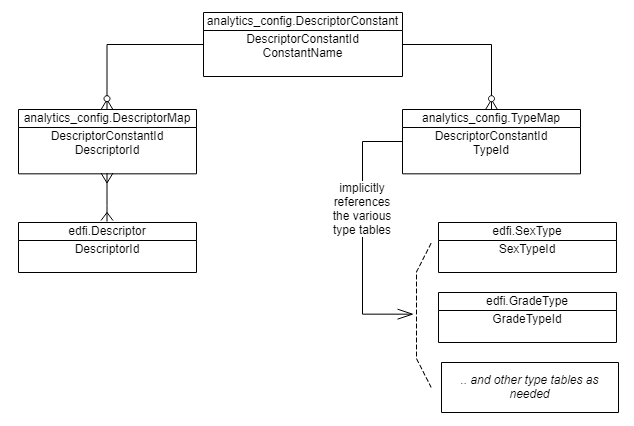
many of the views need to lookup records by Descriptor value - for instance, looking up the Attendance records where a student has an "Excused Absence" or "Unexcused Absence." Because the original developer had access to only a limited dataset, it was not realized that the Descriptor values will vary widely from one implementation to the next. Thus the hard-coding needs to be decoupled, allowing the implementation to provide a mapping from their Descriptor value to the concept used by the Analytics Middle Tier.
In theory, the various "Types" values in Data Standard 2 should provide a more universal constant than the Descriptors. However, some community members report that these too are mutable. Therefore, (a) using Types is not a solution for Data Standard 2, and (b) even those views with hard-coding to Types instead of Descriptors must be modified for greater independence. Note: Type tables were removed in Data Standard 3 precisely because they were not being used in the originally-designed manner.
Design
Summary
- Move hard-coded values to a "Constants" table.
- Create mapping tables that link Descriptors or Types to Constants.
- Modify all views as needed to join to the Constants and new mapping tables.
Example
In Version 1.x, the StudentEarlyWarningFact view reports on excused and unexcused absences, looking for StudentSchoolAttendanceEvent records with attendance descriptor values of either "Excused Absence" or "Unexcused Absence".
In version 2, the view would now search for all StudentSchoolAttendanceEvent records whose descriptor maps to the relevant constant. Thus there would be two DescriptorMap values, one each for "Excused Absence" and "Unexcused Absence." Any school who uses a different term than these two would create a DescriptorMap record mapping that term to the DescriptorConstant value of "Absent".
Implications
Those who install the Analytics Middle Tier will need to carefully assess their Descriptors and Types, and then manage the DescriptorMap table (and TypeMap , for Data Standard 2) accordingly.
Default Mappings
A new command-line Option will be provided to run a script that loads the default Descriptor mapping for the default Ed-Fi descriptors (minimal/populated template descriptors).
.\EdFi.AnalyticsMiddleTier.exe --connectionString "..." --options DefaultMap
Status
Changes to the Student Dimension
Requirements
- Create a "Student" dimension with a single unique key.
- Provide intuitive access to student demographics.
Context
Student Dimension Uniqueness
The Early Warning System fact views both assumed that the StudentDimension would only have a single record for a student. However, a student could be enrolled in multiple schools at the same time, resulting in two records in the StudentDimension for the same StudentKey. This is problematic for the PowerBI Starter Kit, which has a hard requirement for unique StudentKeys.
Demographics in Ed-Fi UDM v2.2
Sources for student demographics:
edfi.Studentcontains sex, Hispanic/Latino ethnicity, economic disadvantaged (Bool), school foodservice eligibility, limited English proficiency.- One-to-many tables:
edfi.StudentCohortYearedfi.StudentDisabilityedfi.StudentLanguageedfi.StudentLanguageUseedfi.StudentProgramAssociationedfi.StudentCharacteristicis a generic table, and contains begin/end dateedfi.StudentRace
Demographics in Ed-Fi UDM v3.x
Sources for student demographics:
edfi.StudentSchoolAssociationcontains School Year, Enrollment Date and Grade Leveledfi.StudentEducationOrganizationAssociationcontains Sex, Hispanic/Latino ethnicity, and Limited English Proficiency- There are a series of many-to-many tables to store specific types of multi-value demographic characteristics - note these can be saved for either the school or the district (or charter, state, ESC, etc.)
edfi.StudentEducationOrganizationAssociationCohortYearedfi.StudentEducationOrganizationAssociationDisabilityedfi.StudentEducationOrganizationAssociationLanguageedfi.StudentEducationOrganizationAssociationLanguageUseedfi.StudentEducationOrganizationAssociationRaceedfi.StudentEducationOrganizationAssociationTribalAffiliation
- And there is the generic
edfi.StudentEducationOrganizationAssociationStudentCharacteristictable, which has a time Period associated with it.- Includes food service eligibility, which was present on
Studentas a Boolean in version 1.
- Includes food service eligibility, which was present on
Dimension or Fact?
While gender, race, and ethnicity all have strings associated with them, some elements of the demographic and enrollment data are more fact-oriented than dimension-oriented:
- IsHispanic
- IsEconomicallyDisadvantaged
- LimitedEnglishProficiency
- SchoolEnrollmentDate
The ODS does not support slowly-changing dimensions, so there is only ever one current snapshot of these data - one cannot tie them to a date unless referring to the enrollment date... except in the case of food service eligibility because there is a time period.
Foodservice Eligibility
Foodservice eligibility is tracked via a Program Association, which not a demographic in the Ed-Fi Unified Data Model. Therefore it should be removed from demographics and placed in the program association views. For supporting the Power Bi Starter Kit, a new Early Warning System view might be needed that tries to preserve the old StudentDimension in some ways, including flattening the foodservice eligibility into a single Boolean value.
Design Proposal
Summary:
- Eliminate the idea of a separate "Student Dimension" in the core data collection.
- Create two new, very similar, dimensions to replace the old
StudentDimension:StudentSchoolDimStudentLocalEducationAgencyDim
- Combine the data from various
edfi.StudentEducationOrganizationAssociationXYZtables into a single view,DemographicDim. - Create two bridge tables to link student information to the characteristics
StudentSchoolDemographicBridgeStudentLocalEducationAgencyDemographicBridge
Rationale for the Student Dimension replacement:
- Students don't (or shouldn't) exist in isolation from an organization - hence no need for a
StudentDim. - Across the Ed-Fi data model, there are two different student relationships:
- With the school (e.g. StudentSchoolAssociation, StudentDisciplineIncident, StudentGradebookEntry, etc.).
And with the more generic Education Organization - which in the current context of the Analytics Middle Tier, generally means Local Education Agency.
Exception: StudentAssessment is only connected directly to a Student! From analytics viewpoint, we will define the Analytics Middle Tier as assuming that analytics on assessment data will always be in the context of a School or Local Education Agency.
- In defining meaningful
StudentSchoolandStudentLocalEducationAgencyentities, there will be some overlap of fields - but the data could be different. This is an inherently dangerous area of the Ed-Fi data model. If we were to combine the data into a single perspective, then we would be hiding the danger. The data analyst will need to read and understand why there are two "root entities" for data reporting, and then choose which one to use based on their implementation. - The Analytics Middle Tier is intended for Local Education Agency use cases. Other use cases can be added in the future as needed to support other types of Education Organizations (e.g. a future view
StudentStateEducationAgencyDim).
Rationale for combining the various characteristic tables into a single point in time view:
- There are seven (in Data Standard 3+) similar characteristics tables that do not have time periods associated with them
- CohortYear
- Disability
- DisabilityDesignation
- Language
- LanguageUse
- Race
- TribalAffiliation
- And there is one with a time period: StudentCharacteristic
- Those without a time period can be combined into a single view for "demographics"
- Those without a time period can also be included in that view, so long as the data analyst understands that the "Bridge" between the student and the demographics represents "data as of right now".
- The two with a time period can, in the future, be used to create new Fact views that link to the date range. See Program Views below.
DemographicDim
Ultimately these values come from the edfi.Descriptor table, although not all descriptors will be here. String values will be used for keys instead of DescriptorId in order to allow combining data from multiple year-specific ODS databases into a single data mart - this would not be possible with the auto-incremented DescriptorId since that value will differ between ODS database instances.
Structure
| Column | Data Type | Source | Description |
|---|---|---|---|
| DemographicKey | String | "{Source Table}" or "{Source Table}.{Descriptor.CodeValue}" | Primary key. Made up of the table source and the Descriptor value. To support hierarchies, there will also be a root Key with only the table source value. |
| DemographicParentKey | String | same as above | Facilitates creation of roll-up / hierarchy in BI tools by relating each individual record to its "parent concept". |
| DemographicLabel | String | "{Descriptor}.{CodeValue}" for all Descriptors related to the relevant tables*. | For parent entities, will be the same as the Key. For child entities, will be the actual demographic label. |
Data Standard 2.2 Source Tables
Descriptors for the following tables:
- StudentCohortYear
- StudentDisability
- StudentLanguage
- StudentLanguageUse
- StudentRace
- StudentCharacteristic (where time dates encompass "now")
Student contains "IsEconomicDisadvantaged" in DS 2, whereas this is now one of the "StudentCharacteristics" in DS 3. In order to have parity between the two data standards, the DemographicDim view therefor needs a hard-coded row that does not come from a table:
| DemographicKey | ParentKey | DemographicLable |
|---|---|---|
| StudentCharacteristic#EconomicDisadvantaged | StudentCharacteristic | Economic Disadvantaged |
Otherwise the sample records will be as with the Data Standard 3+ samples below.
Data Standard 3+ Source Tables
Descriptors for the following tables:
- StudentEducationAgencyCohortYear
- StudentEducationAgencyDisability
- StudentEducationAgencyDisabilityDesignation
- StudentEducationAgencyLanguage
- StudentEducationAgencyLanguageUse
- StudentEducationAgencyRace
- StudentEducationAgencyTribalAffiliation
- StudentEducationAgencyStudentCharacteristic (where time StudentEducationAgencyStudentCharacteristicPeriod encompasses "now")
Sample Records
| DemographicKey | ParentKey | DemographicLabel |
|---|---|---|
| StudentCharacteristic | StudentCharacteristic | StudentCharacteristic |
| StudentCharacteristic#Economic Disadvantaged | StudentCharacteristic | Economic Disadvantaged |
| StudentCharacteristic#Homeless | StudentCharacteristic | Homeless |
| StudentCharacteristic#Runaway | StudentCharacteristic | Runaway |
| Race | Race | Race |
| Race#American Indian - Alaska Native | Race | American Indian - Alaska Native |
| Race#Asian | Race | Asian |
| Race#Black - African American | Race | Black - African American |
| Language | None | Language |
| Language#Adyghe | Language | Adyghe |
| Language#Swiss German | Language | Swiss German |
| etc. |
StudentSchoolDim
Data Standard 2.2
| Column | Data Type | Source | Description |
|---|---|---|---|
| StudentSchoolKey | String | "{Student.StudentUniqueId}-{StudentSchoolAssociation.SchoolId}" | Primary key |
| StudentKey | String | edfi.Student.UniqueId | |
| SchoolKey | String | edfi.StudentSchoolAssociation.SchoolId | |
| SchoolYear | String | edfi.StudentSchoolAssocation.SchoolYear | convert to string to signal to modeling tools that this is not an aggregatable number |
| StudentFirstName | String | edfi.Student.FirstName | |
| StudentMiddleName | String | edfi.Student.MiddleName | |
| StudentLastName | String | edfi.Student.LastSurname | |
| EnrollmentDateKey | String | edfi.StudentSchoolAssociation.EntryDate | formatted as YYYY-MM-DD |
| GradeLevel | String | edfi.Descriptor.CodeValue via edfi.StudentSchoolAssociation.EntryGradeLevelDescriptorId | |
| LimitedEnglishProficiency | String | edfi.Descriptor.CodeValue via edfi.Student.LimitedEnglishProficiencyDescriptorId | Replace null with "Not Applicable" |
| IsHispanic | Boolean | edfi.Student.HispanicLatinoEthnicity | Replace null with 0 |
| Sex | String | edfi.SexType.CodeValue via edfi.Student.SexTypeId | |
| LastModifiedDate | DateTime | Most recent date from any source that has a LastModifiedDate column |
Data Standard 3+
| Column | Data Type | Source | Description |
|---|---|---|---|
| StudentSchoolKey | String | "{Student.StudentUniqueId}-{StudentSchoolAssociation.SchoolId}" | Primary key |
| StudentKey | String | edfi.Student.UniqueId | |
| SchoolKey | String | edfi.StudentSchoolAssociation.SchoolId | |
| SchoolYear | String | edfi.StudentSchoolAssocation.SchoolYear | convert to string to signal to modeling tools that this is not an aggregatable number |
| StudentFirstName | String | edfi.Student.FirstName | |
| StudentMiddleName | String | edfi.Student.MiddleName | |
| StudentLastName | String | edfi.Student.LastSurname | |
| EnrollmentDateKey | String | edfi.StudentSchoolAssociation.EntryDate | formatted as YYYY-MM-DD |
| GradeLevel | String | edfi.Descriptor.CodeValue via edfi.StudentSchoolAssociation.EntryGradeLevelDescriptorId | |
| LimitedEnglishProficiency | String | edfi.Descriptor.CodeValue via edfi.StudentEducationOrganizationAssociation.LimitedEnglishProficiencyDescriptorId | Replace null with "Not Applicable" |
| IsHispanic | Boolean | edfi.StudentEducationOrganizationAssociation.HispanicLatinoEthnicity | Replace null with 0 |
| Sex | String | edfi.Descriptor.CodeValue via edfi.StudentEducationOrganizationAssociation.SexDescriptorId | |
| LastModifiedDate | DateTime | Most recent date from any source that has a LastModifiedDate column |
The (first) primary contact was included in the original Student Dimension to further flatten the model. However, this had a large performance cost. To improve performance, flattening the primary contact is now left as an exercise for downstream semantic models - for example in a SSAS Tabular Data Model.
StudentLocalEducationAgencyDim
Data Standard 2.2
| Column | Data Type | Source | Description |
|---|---|---|---|
| StudentLocalEducationAgencyKey | String | "{Student.StudentUniqueId}-{School.LocalEducationAgencyId}" | Primary key |
| StudentKey | String | edfi.Student.UniqueId | |
| LocalEducationAgencyKey | String | edfi.School.LocalEducationAgencyId | |
| SchoolYear | String | edfi.StudentSchoolAssocation.SchoolYear | convert to string to signal to modeling tools that this is not an aggregatable number |
| StudentFirstName | String | edfi.Student.FirstName | |
| StudentMiddleName | String | edfi.Student.MiddleName | |
| StudentLastName | String | edfi.Student.LastSurname | |
| GradeLevel | String | edfi.Descriptor.CodeValue via edfi.StudentSchoolAssociation.EntryGradeLevelDescriptorId | |
| LimitedEnglishProficiency | String | edfi.Descriptor.CodeValue via edfi.Student.LimitedEnglishProficiencyDescriptorId | Replace null with "Not Applicable" |
| IsHispanic | Boolean | edfi.Student.HispanicLatinoEthnicity | Replace null with 0 |
| Sex | String | edfi.SexType.CodeValue via edfi.Student.SexTypeId | |
| LastModifiedDate | DateTime | Most recent date from any source that has a LastModifiedDate column |
Data Standard 3+
| Column | Data Type | Source | Description |
|---|---|---|---|
| StudentLocalEducationAgencyKey | String | "{Student.StudentUniqueId}-{School.LocalEducationAgencyId}" | Primary key |
| StudentKey | String | edfi.Student.UniqueId | |
| LocalEducationAgencyKey | String | edfi.School.LocalEducationAgencyId | |
| SchoolYear | String | edfi.StudentSchoolAssocation.SchoolYear | convert to string to signal to modeling tools that this is not an aggregatable number |
| StudentFirstName | String | edfi.Student.FirstName | |
| StudentMiddleName | String | edfi.Student.MiddleName | |
| StudentLastName | String | edfi.Student.LastSurname | |
| GradeLevel | String | edfi.Descriptor.CodeValue via edfi.StudentSchoolAssociation.EntryGradeLevelDescriptorId | |
| LimitedEnglishProficiency | String | edfi.Descriptor.CodeValue via edfi.StudentEducationOrganizationAssociation.LimitedEnglishProficiencyDescriptorId | Replace null with "Not Applicable" |
| IsHispanic | Boolean | edfi.StudentEducationOrganizationAssociation.HispanicLatinoEthnicity | Replace null with 0 |
| Sex | String | edfi.Descriptor.CodeValue via edfi.StudentEducationOrganizationAssociation.SexDescriptorId | |
| LastModifiedDate | DateTime | Most recent date from any source that has a LastModifiedDate column |
StudentSchoolDemographicsBridge
Data Standard 2.2
| Column | Data Type | Source | Description |
|---|---|---|---|
| StudentSchoolDemographicBridgeKey | String | "{DemographicKey}-{StudentSchoolKey}" | Primary key |
| StudentSchoolKey | String | "{Student.StudentUniqueId}-{StudentSchoolAssociation.SchoolId}" | Foreign key |
| DemographicKey | String | DemographicDim.DemographicKey | Foreign key |
Must be composed of a series of union queries that combine records from these tables:
- StudentCohortYear
- StudentDisability
- StudentLanguage
- StudentLanguageUse
- StudentRace
- StudentCharacteristic (where time dates encompass "now")
As well as a record for "StudentCharacteristic#Economic Disadvantaged" if Student.IsEconomicDisadvantaged is true.
Data Standard 3+
| Column | Data Type | Source | Description |
|---|---|---|---|
| StudentSchoolDemographicBridgeKey | String | "{DemographicKey}-{StudentSchoolKey}" | Primary key |
| StudentSchoolKey | String | "{Student.StudentUniqueId}-{StudentSchoolAssociation.SchoolId}" | Foreign key |
| DemographicKey | String | DemographicDim.DemographicKey | Foreign key |
Must be composed of a series of union queries that combine records from these tables:
- StudentEducationOrganizationCohortYear
- StudentEducationOrganizationDisability
- StudentEducationOrganizationDisabilityDesignation
- StudentEducationOrganizationLanguage
- StudentEducationOrganizationLanguageUse
- StudentEducationOrganizationRace
- StudentEducationOrganizationTribalAffiliation
- StudentEducationOrganizationStudentCharacteristic (where StudentEducationOrganizationStudentCharacteristicPeriod dates encompass "now")
The joins need to be from Student → StudentSchoolAssociation → these tables, with StudentSchoolAssociation.SchoolId serving as the EducationOrganizationId in the joins.
StudentLocalEducationAgencyDemographicsBridge
Data Standard 2.2
| Column | Data Type | Source | Description |
|---|---|---|---|
| StudentLocalAgencyDemographicBridgeKey | String | "{DemographicKey}-{StudentLocalEducationAgencyKey}" | Primary key |
| StudentLocalEducationAgencyKey | String | "{Student.StudentUniqueId}-{School.LocalEduationAgencyId}" | Foreign key |
| DemographicKey | String | DemographicDim.DemographicKey | Foreign key |
Must be composed of a series of union queries that combine records from these tables:
- StudentCohortYear
- StudentDisability
- StudentLanguage
- StudentLanguageUse
- StudentRace
- StudentCharacteristic (where time dates encompass "now")
As well as a record for "StudentCharacteristic#Economic Disadvantaged" if Student.IsEconomicDisadvantaged is true.
Data Standard 3+
| Column | Data Type | Source | Description |
|---|---|---|---|
| StudentLocalAgencyDemographicBridgeKey | String | "{DemographicKey}-{StudentLocalEducationAgencyKey}" | Primary key |
| StudentLocalEducationAgencyKey | String | "{Student.StudentUniqueId}-{LocalEduationAgency.EducationOrganizationId}" | Foreign key |
| DemographicKey | String | DemographicDim.DemographicKey | Foreign key |
Must be composed of a series of union queries that combine records from these tables:
- StudentEducationOrganizationCohortYear
- StudentEducationOrganizationDisability
- StudentEducationOrganizationDisabilityDesignation
- StudentEducationOrganizationLanguage
- StudentEducationOrganizationLanguageUse
- StudentEducationOrganizationRace
- StudentEducationOrganizationTribalAffiliation
- StudentEducationOrganizationStudentCharacteristic (where StudentEducationOrganizationStudentCharacteristicPeriod dates encompass "now")
The joins need be from Student → StudentSchoolAssociation → School, with the School.LocalEducationAgencyId serving as the EducationOrganizationId in the other joins.
Alternatives
The following alternatives were considered and rejected
Split StudentDim into StudentDim and StudentEnrollmentDim
The original StudentDimension would be split in two: StudentDim with no SchoolKey in it and a StudentEnrollmentDim (or StudentDemographicDim ) holding the Student-to-school relationship and demographics. Rejected for these reasons:
- Trying to keep the number of views as small as possible, so that the domain model is easier to understand compared to the source Ed-Fi data model.
- Generally need to query for that student-school relationship - not for a student in isolation.
- Keeping only a single "enrollment" or "demographic" dimension for the student requires implementing business logic to determine which demographics take precedence - if demographics are saved for both school and local education agency, then when one should be used? Whichever choice is made, it will likely be wrong for many implementations.
Change StudentDim to StudentSchoolDim
In this version, the old StudentDimension is essentially renamed to StudentSchoolDim - largely preserving the old structure. Compared to the proposed model, this version allows the data analyst to quickly and easily find the right student information. It also relieves the analyst from having to decide which version of truth to use - the School or the Local Education Agency. As mentioned above, it has been decided that the Analytics Middle Tier should not gloss over this difficulty: the data analyst must inspect their implementation and decide which perspective (School or Local Education Agency) is appropriate in each circumstance.
Create Separate Bridge Tables for Each Demographic
Instead of combining the demographics into a single bridge view, we could have created one for each concept: Disability, Race, Tribal Affiliation, etc. On one level, this would have simplified the data analyst's work when looking for a particular demographic field: they can just look for the view with the word "Race" in the name, for example. However, this comes at the expense of proliferating more tables, making the Analytics Middle Tier look too much like the Ed-Fi data standard.
Status
Planning to adopt this dual-root (Student-School and Student-LocalEducationAgency) approach. Stephen Fuqua
Program Views
Requirement
Support analytics on Program Participation at the school level.
Context
A small set of Program-related views was added to Analytics Middle Tier as an experiment in supporting a second use-case: analyzing student program participation. Programs in the default Ed-Fi ODS template include "Bilingual", "Career and Technical Education", "Special Education", and a few others. These data are represented in two different fact views: analytics.StudentProgramEvent and analytics.StudentProgramFact
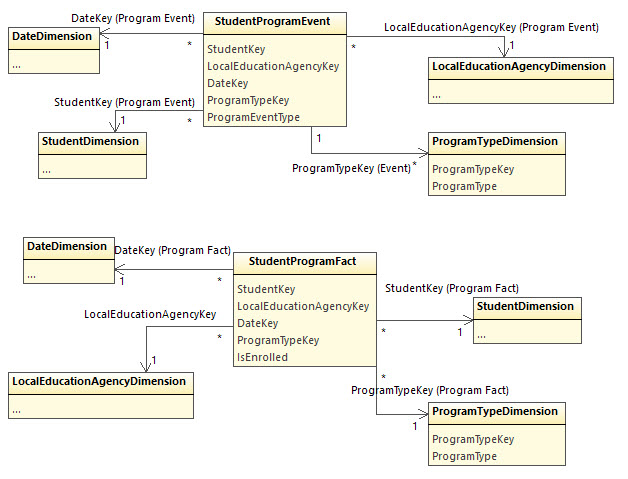
The "Event" view represents the date on which a student entered or exited a program. The "Fact" view represents every day on which the student was in a program. Each perspective has its own utility in analytics / reporting.
Note, however, that they both join to analytics.LocalEducationAgencyDimension . There is no linkage to schools. This is because the data modeler originally heard (or thought he heard) that program enrollment is "always" at the district level. Since then, he has received feedback that many implementations do link students to programs at the school level, or even at the state level.
Design
a Remove the Views
Eliminate the problem by eliminating the views, unless and until we get a detailed real-world use case definition that would solve these problems.
b Add a SchoolKey to Both Views
This implies that SchoolKey or LocalEducationAgencyKey could be null, generally an undesirable situation in dimensional modeling. A few options:
- Ignore the problem: downstream data analyst have to join the program views to
SchoolDimensionorLocalEducationAgencyDimensionwith an outer join. Good for data architect.
- Dangerous for data analyst.
- Nulls can be eliminated - or at least nearly eliminated - for
LocalEducationAgencyKeyby loading a School'sLocalEducationAgencyKeyvalue.- Moderate additional complexity for data architecture.
- Resolves one outer join problem but leaves the other in place.
- Create a "fake school" for each LEA in the
SchoolDimension, withSchoolName = 'n/a'. Use this as theSchoolKeywhen program participation is only at the LEA level.- Ugly for the data architect, although not impossible.
- Resolves the other outer join problem, at the expense of having a strange "District" entry show up in School filters. Dubious value.
- Separate the views into copies for School and LocalEducationAgency.
 Just forces the problem onto the data analyst.
The Data Standard shows that a School can belong to 0 or 1 Local Education Agency. Side note: that Agency might be a Charter Management Organization. Thus option 2 can still lead to lost records when using an INNER JOIN. As with Option 3, null/missing records can be eliminated by creating a "n/a" LocalEducationAgency for these schools.
If these program views are to be kept, then a combination of options 2 and 3 seems like the only option that presents a useful interface to the data analyst.
Status
Going to defer for a real use case so that we don't mislead anyone. Taking the program views out of Analytics Middle Tier 2.0. Must remember to address FoodService when coming back to this in Analytics Middle Tier 2.1+.
BIA-293 - Getting issue details... STATUS
School Year
Requirement
Add SchoolYear to help support longitudinal data / multi-year databases. Wherever possible, would be nice to support drill-down hierarchies by school year.
Design
The following dimension views could have a SchoolYear column in them; Data Standard 2's support for School Year is limited compared to Data Standard 3.
| Data Standard 2 | Data Standard 3 |
|---|---|
| Student / Student Enrollment | Student / Student Enrollment |
| Student Section | Student Section |
| Date | |
| Grading Period |
The multi-year use-case was not originally one of the goals of the Analytics MIddle Tier, so no consideration was given to adding to the two views that could support it. It will be trivial to add to these two views in common above.
For Date and Grading Period, there is real value. To support in Data Standard 2, we would need to create a mapping table or extra column on each of those two tables. This takes into account that one record could below to multiple school years in some edge cases. The additional effort required may push solving for Date and Grading Period to a future release, e.g. Analytics Middle Tier 2.1.
Decided to support SchoolYear in the student-school relationship and in the student-section relationship in Analytics Middle Tier 2.0. SchoolYear column will exist for Data Standard 2 but will not be populated where not available. Stephen Fuqua
Separation Between Core and Use-Case Views
Requirement
Manage a collection of "core" views and separate collections of use-case specific views.
Design
The application already has a concept for installing optional components, which was first created for optional install of additional indexes in the ODS. Proposal:
- Always install a core set of views
- ContactPersonDimension
- DateDimension
- GradingPeriodDimension
- LocalEducationAgencyDimension
- MostRecentGradingPeriod
- SchoolDimension
- SchoolNetworkAssociationDimension
- StudentDimension
- StudentEnrollmentDimension (if created, see above)
- StudentSectionDimension
- Move some of the existing views into new optional collections:
- Row-level Security (RLS)
- StudentDataAuthorization
- UserAuthorization
- UserDimension
- Early Warning System (EWS)
- StudentEarlyWarningFact
- StudentSectionGradeFact
- QuickSight-Early Warning System (QEWS)
- Ews_SchoolRiskTrend
- Ews_StudentAttendanceTrend
- Ews_StudentEnrolledSectionGrade
- Ews_StudentEnrolledSectionGradeTrend
- Ews_StudentIndicators
- Ews_StudentIndicatorsByGradingPeriod
- Ews_UserSchoolAuthorization
- Program Analysis (PROGRAM)
- ProgramTypeDimension
- StudentProgramEvent
StudentProgramFact
Thus to install the Early Warning System and Row-level security collections used by the Power BI Starter Kit v2, the admin user would run this command:
.\EdFi.AnalyticsMiddleTier.exe --connectionString "..." --options EWS RLS
- Row-level Security (RLS)
- Avoid name overlaps
Option 1: separate by "namespace" (schema). Instead of having a single
analyticsschema, we could create ananalytics_coreschema and other schemas to match use cases:v1 Name v2 Name analytics.ContactPersonDimension analytics_core.ContactPersonDimension analytics.DateDimension analytics_core.DateDimension analytics.Ews_SchoolRiskTrend analytics_qews.SchoolRiskTrend analytics.Ews_StudentAttendanceTrend analytics_qews.StudentAttendanceTrend analytics.Ews_StudentEnrolledSectionGrade analytics_qews.StudentEnrolledSectionGrade analytics.Ews_StudentEnrolledSectionGradeTrend analytics_qews.StudentEnrolledSectionGradeTrend analytics.Ews_StudentIndicators analytics_qews.StudentIndicators analytics.Ews_StudentIndicatorsByGradingPeriod analytics_qews.StudentIndicatorsByGradingPeriod analytics.Ews_UserSchoolAuthorization analytics_qews.UserSchoolAuthorization analytics.GradingPeriodDimension analytics_core.GradingPeriodDimension analytics.LocalEducationAgencyDimension analytics_core.LocalEducationAgencyDimension analytics.MostRecentGradingPeriod analytics_core.MostRecentGradingPeriod analytics.ProgramTypeDimension analytics_program.ProgramTypeDimension analytics.SchoolDimension analytics_core.SchoolDimension analytics.SchoolNetworkAssociationDimension analytics_core.SchoolNetworkAssociationDimension analytics.StudentDataAuthorization analytics_rls.StudentDataAuthorization analytics.StudentDimension analytics_core.StudentDimension analytics.StudentEarlyWarningFact analytics_ews.StudentEarlyWarningFact analytics.StudentProgramEvent analytics_program.StudentProgramEvent analytics.StudentProgramFact analytics_program.StudentProgramFact analytics.StudentSectionDimension analytics_core.StudentSectionDimension analytics.StudentSectionGradeFact analytics_ews.StudentSectionGradeFact analytics.UserAuthorization analytics_rls.UserAuthorization analytics.UserDimension analytics_rls.UserDimension analytics.UserStudentDataAuthorization analytics_rls.UserStudentDataAuthorization Option 2: keep everything in a single schema, ensuring unique names, so that downstream data models (without namespaces/schemas) do not need to name their models differently than the views. Put use case name as object name prefix.
v1 Name v2 Name analytics.ContactPersonDimension analytics.ContactPersonDim analytics.DateDimension analytics.DateDim analytics.Ews_SchoolRiskTrend analytics.qews_SchoolRiskTrend analytics.Ews_StudentAttendanceTrend analytics.qews_StudentAttendanceTrend analytics.Ews_StudentEnrolledSectionGrade analytics.qews_StudentEnrolledSectionGrade analytics.Ews_StudentEnrolledSectionGradeTrend analytics.qews_StudentEnrolledSectionGradeTrend analytics.Ews_StudentIndicators analytics.qews_StudentIndicators analytics.Ews_StudentIndicatorsByGradingPeriod analytics.qews_StudentIndicatorsByGradingPeriod analytics.Ews_UserSchoolAuthorization analytics.qews_UserSchoolAuthorization analytics.GradingPeriodDimension analytics.GradingPeriodDim analytics.LocalEducationAgencyDimension analytics.LocalEducationAgencyDim analytics.MostRecentGradingPeriod analytics.MostRecentGradingPeriod analytics.ProgramTypeDimensionanalytics.program_ProgramTypeDimensionanalytics.SchoolDimension analytics.SchoolDim analytics.SchoolNetworkAssociationDimension analytics.SchoolNetworkAssociationDim analytics.StudentDataAuthorization analytics.rls_StudentDataAuthorization analytics.StudentDimension analytics.StudentDim analytics.StudentEarlyWarningFact analytics.ews_StudentEarlyWarningFact analytics.StudentProgramEventanalytics.program_StudentProgramEventanalytics.StudentProgramFactanalytics.program_StudentProgramFactanalytics.StudentSectionDimension analytics.StudentSectionDim analytics.StudentSectionGradeFact analytics.ews_StudentSectionGradeFact analytics.UserAuthorization analytics.rls_UserAuthorization analytics.UserDimension analytics.rls_UserDim analytics.UserStudentDataAuthorization analytics.rls_UserStudentDataAuthorization Option 3: keep everything in single schema and don't force prefixing for use cases. Just have clear and unique names for views. Prefix on case-by-case basis.
Leaning toward option (b). Additional benefit: helps the reader know where to look up additional information about use-case specific views, such as important usage notes.
Additional Views
Will not add any new views in the 2.0 release. New views can be added with 2.1, 2.2 etc. This 2.0 release is all about fixing architectural problems and setting the stage for broader adoption.
Documentation
End-Users
Decisions made in defining the Ed-Fi data model are allowing a great deal of flexibility in storing data, at the expense of un-intuitive complexity. Users of the Analytics Middle Tier need to know about the complexities in order to use this tool effectively. For example, if adopting option (b) to solve the Program view problem, there needs to be clear guidance to help the end-user.
Users also need to be made aware of potential data quality issues, for example with the Student Demographics. If a student is enrolled in two schools at a time, and they don't both enter the same demographic information (e.g. one accidentally clicks on the wrong gender, or one does not mark student as Hispanic/Latino), then how will the data analyst know and reconcile this? The Ed-Fi Alliance cannot prescribe an answer: it depends on the implementation.
For the (rare?) case that the console deployment tool does not work, provide guidance on directly accessing the views from the source code repository. Warn that scripts, when manually executed, need to be run in numeric order of file name, starting with the Core collection first and then installing other collections as needed.
Other issues will likely arise, so that end-user documentation will be an ongoing exercise.
Contributors
Documentation for contributors to the project will need to spell out how to contribute; how to create use-cases; naming conventions; when and how to place a new view into the Core collection.
Version 2 versus Version 3 support.